
spark-k8s-anomaly-detection-taxi-data
Install this demo on an existing Kubernetes cluster:
$ stackablectl demo install spark-k8s-anomaly-detection-taxi-data|
This demo should not be run alongside other demos. |
System Requirements
To run this demo, your system needs at least:
-
10 cpu units (core/hyperthread)
-
34GiB memory
-
35GiB disk storage
Overview
This demo will
-
Install the required Stackable operators.
-
Spin up the following data products:
-
Trino: A fast distributed SQL query engine for big data analytics that helps you explore your data universe. This demo uses it to enable SQL access to the data.
-
Spark: A multi-language engine for executing data engineering, data science, and machine learning. This demo uses it to batch-process data from S3 by training and scoring an unsupervised anomaly detection model and writing the results into a Trino table. Spark uses an isolation forest algorithm from the scikit-learn machine learning library in this demo.
-
Garage: S3 compatible object store. This demo uses it as persistent storage to store all the data used
-
Hive metastore: A service that stores metadata related to Apache Hive and other services. This demo uses it as metadata storage for Trino and Spark.
-
Open policy agent (OPA): An open-source, general-purpose policy engine unifies policy enforcement across the stack. This demo uses it as the authorizer for Trino, which decides which user can query which data.
-
Superset: A modern data exploration and visualization platform. This demo utilizes Superset to retrieve data from Trino via SQL queries and build dashboards on top of that data.
-
-
Create a Kubernetes job to upload the taxi data to the S3 staging area. The data is stored in parquet format.
-
A Spark batch job is started, which fetches the raw data, trains and scores a model, writing out the results to Trino/S3 for use by Superset.
-
Create Superset dashboards for visualization of the anomaly detection scores.
You can see the deployed products and their relationship in the following diagram:

List the deployed Stackable services
To list the installed Stackable services run the following command:
$ stackablectl stacklet list

┌──────────┬───────────────┬───────────┬─────────────────────────────────────────────────────────────────────────────┬─────────────────────────────────┐
│ PRODUCT  ┆ NAME          ┆ NAMESPACE ┆ ENDPOINTS                                                                   ┆ CONDITIONS                      │
╞══════════╪═══════════════╪═══════════╪═════════════════════════════════════════════════════════════════════════════╪═════════════════════════════════╡
│ hive     ┆ hive          ┆ default   ┆ metastore-hive     hive-metastore.default.svc.cluster.local:9083            ┆ Available, Reconciling, Running │
├╌╌╌╌╌╌╌╌╌╌┼╌╌╌╌╌╌╌╌╌╌╌╌╌╌╌┼╌╌╌╌╌╌╌╌╌╌╌┼╌╌╌╌╌╌╌╌╌╌╌╌╌╌╌╌╌╌╌╌╌╌╌╌╌╌╌╌╌╌╌╌╌╌╌╌╌╌╌╌╌╌╌╌╌╌╌╌╌╌╌╌╌╌╌╌╌╌╌╌╌╌╌╌╌╌╌╌╌╌╌╌╌╌╌╌╌┼╌╌╌╌╌╌╌╌╌╌╌╌╌╌╌╌╌╌╌╌╌╌╌╌╌╌╌╌╌╌╌╌╌┤
│ hive     ┆ hive-iceberg  ┆ default   ┆ metastore-hive     hive-iceberg-metastore.default.svc.cluster.local:9083    ┆ Available, Reconciling, Running │
├╌╌╌╌╌╌╌╌╌╌┼╌╌╌╌╌╌╌╌╌╌╌╌╌╌╌┼╌╌╌╌╌╌╌╌╌╌╌┼╌╌╌╌╌╌╌╌╌╌╌╌╌╌╌╌╌╌╌╌╌╌╌╌╌╌╌╌╌╌╌╌╌╌╌╌╌╌╌╌╌╌╌╌╌╌╌╌╌╌╌╌╌╌╌╌╌╌╌╌╌╌╌╌╌╌╌╌╌╌╌╌╌╌╌╌╌┼╌╌╌╌╌╌╌╌╌╌╌╌╌╌╌╌╌╌╌╌╌╌╌╌╌╌╌╌╌╌╌╌╌┤
│ opa      ┆ opa           ┆ default   ┆                                                                             ┆ Available, Reconciling, Running │
├╌╌╌╌╌╌╌╌╌╌┼╌╌╌╌╌╌╌╌╌╌╌╌╌╌╌┼╌╌╌╌╌╌╌╌╌╌╌┼╌╌╌╌╌╌╌╌╌╌╌╌╌╌╌╌╌╌╌╌╌╌╌╌╌╌╌╌╌╌╌╌╌╌╌╌╌╌╌╌╌╌╌╌╌╌╌╌╌╌╌╌╌╌╌╌╌╌╌╌╌╌╌╌╌╌╌╌╌╌╌╌╌╌╌╌╌┼╌╌╌╌╌╌╌╌╌╌╌╌╌╌╌╌╌╌╌╌╌╌╌╌╌╌╌╌╌╌╌╌╌┤
│ superset ┆ superset      ┆ default   ┆ node-http          http://superset-node.default.svc.cluster.local:8088      ┆ Available, Reconciling, Running │
├╌╌╌╌╌╌╌╌╌╌┼╌╌╌╌╌╌╌╌╌╌╌╌╌╌╌┼╌╌╌╌╌╌╌╌╌╌╌┼╌╌╌╌╌╌╌╌╌╌╌╌╌╌╌╌╌╌╌╌╌╌╌╌╌╌╌╌╌╌╌╌╌╌╌╌╌╌╌╌╌╌╌╌╌╌╌╌╌╌╌╌╌╌╌╌╌╌╌╌╌╌╌╌╌╌╌╌╌╌╌╌╌╌╌╌╌┼╌╌╌╌╌╌╌╌╌╌╌╌╌╌╌╌╌╌╌╌╌╌╌╌╌╌╌╌╌╌╌╌╌┤
│ trino    ┆ trino         ┆ default   ┆ coordinator-https  https://trino-coordinator.default.svc.cluster.local:8443 ┆ Available, Reconciling, Running │
└──────────┴───────────────┴───────────┴─────────────────────────────────────────────────────────────────────────────┴─────────────────────────────────┘|
When a product instance has not finished starting yet, the service will have no endpoint. Depending on your internet connectivity, creating all the product instances might take considerable time. A warning might be shown if the product is not ready yet. |
S3
List Buckets
The S3 provided by Garage is used as persistent storage to store all the data used.
Garage has no web interface, so the buckets are inspected with an S3 client.
Read the endpoint and credentials out of the cluster:
$ KUBECTL_NAMESPACE="default" # or whichever you set when running stackablectl demo install
$ export S3_ENDPOINT="https://$(kubectl -n "$KUBECTL_NAMESPACE" get nodes -o jsonpath='{.items[0].status.addresses[?(@.type=="InternalIP")].address}'):$(kubectl -n "$KUBECTL_NAMESPACE" get service garage -o jsonpath='{.spec.ports[0].nodePort}')"
$ export S3_ACCESS_KEY="$(kubectl -n "$KUBECTL_NAMESPACE" get secret s3-credentials -o jsonpath='{.data.accessKey}' | base64 -d)"
$ export S3_SECRET_KEY="$(kubectl -n "$KUBECTL_NAMESPACE" get secret s3-credentials -o jsonpath='{.data.secretKey}' | base64 -d)"
$ export S3_REGION=region-1
The region is not optional. Garage rejects any request signed for a different region than the one it is configured with, and most clients fall back to an AWS region when none is set.
The certificate is issued by the Stackable secret-operator, whose CA your machine does not trust, so the commands below skip certificate verification.
-
AWS CLI
-
rclone
$ export AWS_ENDPOINT_URL="$S3_ENDPOINT"
$ export AWS_ACCESS_KEY_ID="$S3_ACCESS_KEY"
$ export AWS_SECRET_ACCESS_KEY="$S3_SECRET_KEY"
$ export AWS_DEFAULT_REGION="$S3_REGION"
$ aws configure set default.s3.addressing_style path
The commands below are written for rclone.
The aws equivalents are aws s3 ls to list buckets and aws s3 ls s3://<bucket>/ --recursive --human-readable to list objects, both with --no-verify-ssl.
rclone needs no installation, it runs straight from a container image:
$ rclone() {
    docker run --rm -i --network host \
      -e RCLONE_S3_PROVIDER=Other \
      -e RCLONE_S3_ENDPOINT="$S3_ENDPOINT" \
      -e RCLONE_S3_REGION="$S3_REGION" \
      -e RCLONE_S3_ACCESS_KEY_ID="$S3_ACCESS_KEY" \
      -e RCLONE_S3_SECRET_ACCESS_KEY="$S3_SECRET_KEY" \
      -e RCLONE_S3_FORCE_PATH_STYLE=true \
      -e RCLONE_NO_CHECK_CERTIFICATE=true \
      rclone/rclone:1.75.1 "$@"
  }
--network host is there for anyone trying the demos out on a local cluster, where the endpoint is only reachable from the host itself.
In the commands below, lsd lists buckets, lsf lists names only, and lsl adds sizes and modification times.
$ rclone lsd :s3:There are two buckets:
-
demo: The demo loads static datasets into this area. It is stored in parquet format. It forms the basis for the model that Spark will train. -
prediction: This bucket is where the model scores persist. The data is stored in the Apache Iceberg table format.
Inspect raw data
$ rclone lsl :s3:demo/ny-taxi-data/rawThis prefix contains a dataset of similarly structured data files. The data is partitioned by month and contains several hundred MBs, which may seem small for a dataset. Still, the model is a time-series model where the data has decreasing relevance the "older" it is, especially when the data is subject to multiple external factors, many of which are unknown and fluctuating in scope and effect.
The second bucket prediction contains the output from the model scoring process:
$ rclone lsl :s3:prediction/anomaly-detectionThis is a much smaller file, as it only contains scores for each aggregated period.
Spark
The Spark job ingests the raw data and performs straightforward data wrangling and feature engineering. Any windowing features designed to capture the time-series nature of the data - such as lags or rolling averages - need to use evenly distributed partitions so that Spark can execute these tasks in parallel. The job uses an implementation of the Isolation Forest algorithm provided by the scikit-learn library: the model is trained in a single task and distributed among executors with the help of a PySpark user defined function. The Isolation Forest algorithm is used for unsupervised model training, meaning that a labelled set of data - against which the model is trained - is unnecessary. This makes model preparation easier as we do not have to divide the data set into training and validation datasets.
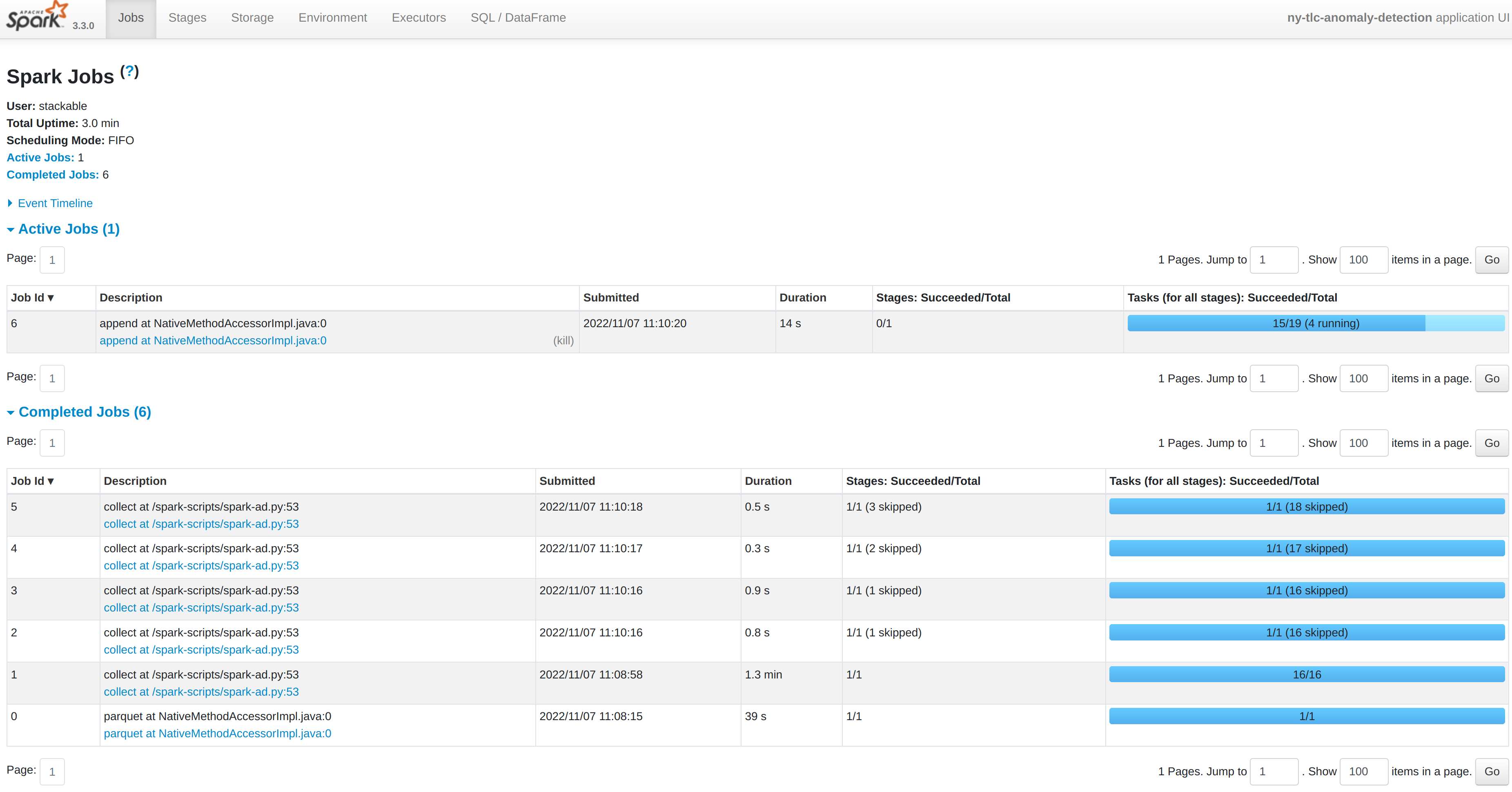
You can inspect a running Spark job by forwarding the port used by the Spark-UI:
| This is only possible while the job pod is running. Otherwise you will get an error. |
$ kubectl port-forward spark-ad-driver 4040and then opening a browser tab to http://localhost:4040:
Dashboard
Open the external-http Superset endpoint found in the output of the stackablectl stacklet list command.
Alternatively, create a port-forward to the Superset service and point your browser to http://localhost:8088:
$ kubectl port-forward service/superset-node 8088:httpThe anomaly detection dashboard is pre-defined and accessible under the Dashboards tab when logged in to Superset using the username admin password adminadmin:
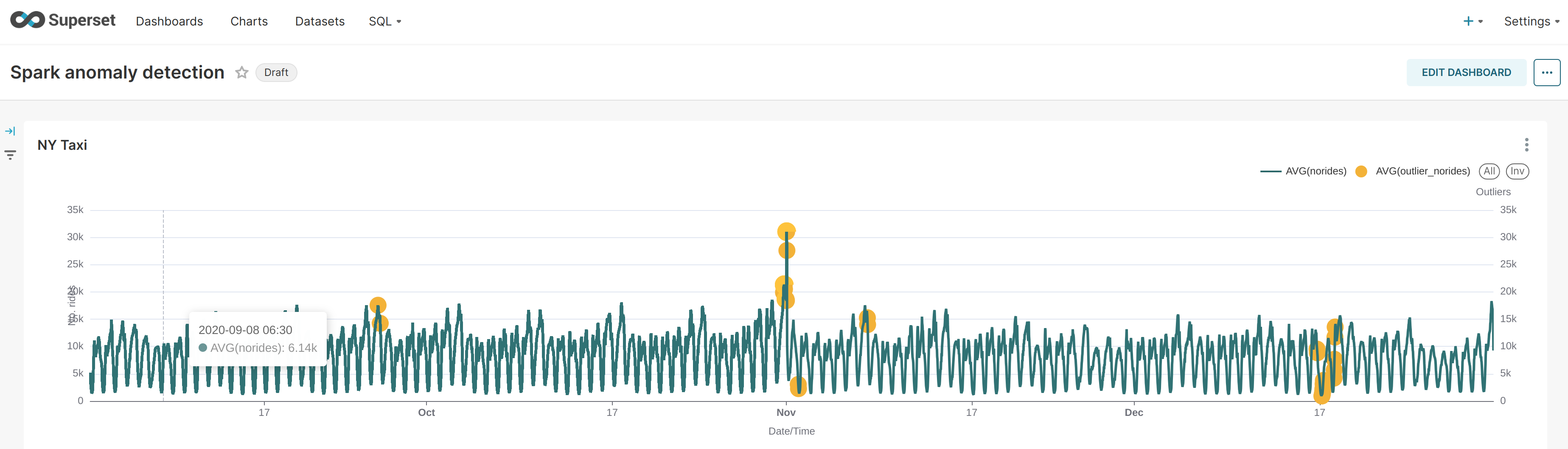
The model does not yield data that can be used directly for a root cause analysis. An isolation forest is a type of random forest that measures how many branches are needed in its underlying decision trees to isolate each data point: the more abnormal the data, the easier this will be - a clear outlier may only need a single partition to isolate it, whereas tightly clustered data will require significantly more. The number of partitions to isolate is, therefore, in inverse proportion to the anomaly-ness of the data.